
Get the bank behind an IBAN without leaving the page you're on.
Scan any page and every IBAN on it is checked and named - bank, BIC, city, country. Free, and there is nothing to sign up for.

Scan a page: valid IBANs turn green, a mistyped one turns red, and the bank appears where the IBAN sits.
Why not just validate?
Anyone can check an IBAN's checksum - it is an open algorithm, and a dozen free sites compute it. The harder part is turning the national bank code inside the IBAN into a named institution, and that needs reference data.
This extension carries bank data for 60+ countries, compiled from national sources:
Deutsche Bundesbank · Oesterreichische Nationalbank · National Bank of Ukraine · Banka Slovenije · Banco de España · Narodná banka Slovenska · Banco Central do Brasil · Bits AS · Finanssiala · Central Bank of Cyprus · GLEIF
Where a bank is not in our data, the extension says so rather than coming back blank. An honest gap is more useful than a confident guess when the answer is going on a transfer form.
Or right-click a single IBAN
No scan needed. Select an IBAN anywhere on the web - an email, an invoice, a supplier record - and check it from the context menu.

On selected text: validate it, or get the full bank details.
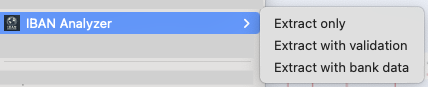
On an image: read the IBANs out of a screenshot or a scanned invoice. This one needs a free account - 10 a month.
A whole supplier list, into a spreadsheet
Resolve every IBAN on a page, then copy the results straight into Google Sheets or Excel, or download them as CSV. No mapping dialog, no import wizard.
Signing up is only needed to read IBANs out of an image - it is the one thing that cannot be metered without an account. Everything else works signed out.
Copy for Sheets, then paste. Seven suppliers land as columns.
Check the bank details before the payment run
Free, no account, and it works on any page you open.