
IBAN Analyzer Browser Extension
Extract, validate, and analyze IBANs from text or images directly in your browser. Right-click on any IBAN text to validate or get bank details, or right-click any image to extract IBANs and optionally validate and fetch bank information—no copy-paste needed.

Key Features
From Text or Images
Right-click on any IBAN text to validate or analyze it. Right-click any image on a page to extract IBANs from it, then validate or get full bank details. Works on any website—no copy-paste needed.
Validate or Full Analysis
Choose quick validation or detailed analysis with bank name, country, and more. For images: extract only, extract with validation, or extract with bank info.
Elegant Notifications
Results appear as beautiful floating overlays that don't interfere with your browsing experience.
Real-time API
Powered by our comprehensive IBAN analysis API with up-to-date bank and country information.
Free to Look Up
Checking an IBAN is free and unlimited, with no sign-up. A paid plan adds scanning a whole page at once and exporting the results to a spreadsheet.
Secure & Private
The extension sends only the IBAN you ask it to check, and nothing else. You sign in only if you want the paid bulk features.
See It In Action
IBAN Analyzer
Clean, intuitive interface with dual-mode functionality
IBAN Analysis:
×Rich analysis results with bank details and country information
Using the Context Menu
On any browser page, right-click selected IBAN text or an image to validate, analyze, or extract IBANs from the context menu.
Select IBAN text on the page, right-click, then choose Validate IBAN or Analyze IBAN.

Right-click any image that may contain IBANs, then choose Extract only, Extract with validation, or Extract with bank data.
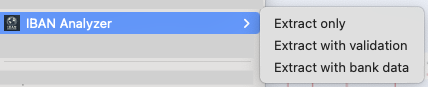
How to Use the Context Menu
From text
Highlight any IBAN text on the page, then right-click. Choose "Validate IBAN" for quick checks or "Analyze IBAN" for full bank and country details. Use this for analyzing IBANs from selected text.
From an image
Right-click any image that may contain IBANs. Choose IBAN Analyzer → "Extract only", "Extract with validation", or "Extract with bank data" to extract and optionally validate or get bank information. Use this for analyzing IBANs from images.
Choose your action
For text: select "Validate IBAN" or "Analyze IBAN". For images: select "Extract only", "Extract with validation", or "Extract with bank data". Results appear in a notification.
Why Use the Context Menu?
- ✓ Works on both selected text and images—no need to save or upload files
- ✓ Validate, analyze, or extract IBANs on any website
- ✓ Instant access with one right-click
Two Ways to Extract IBANs from Images
Right-click on any image
On any webpage, right-click an image that may contain IBANs and choose IBAN Analyzer → Extract only, Extract with validation, or Extract with bank data. No need to save or upload the image first.
Or use the extension popup
Open the extension and switch to the "Extract from image" tab. Drop an image or click to choose one. Pick the same three modes: extract only, validate, or get full bank details.
How to Use
Install the Extension
Click the "Install from Chrome Web Store" button above to add the extension to your browser.
Look Up an IBAN
Open the popup and paste an IBAN, or right-click one on any page. No account needed — you get the bank name, BIC and address straight away.
Use from Text or Images
For text: highlight any IBAN on the page, right-click, and choose "Validate IBAN" or "Analyze IBAN". For images: right-click the image and choose IBAN Analyzer → Extract only, Extract with validation, or Extract with bank data.
View Results
Results appear in a notification with validation status and, for analysis, bank and country details.
Ready to Get Started?
Install the IBAN Analyzer Browser Extension and validate IBANs directly from any website.